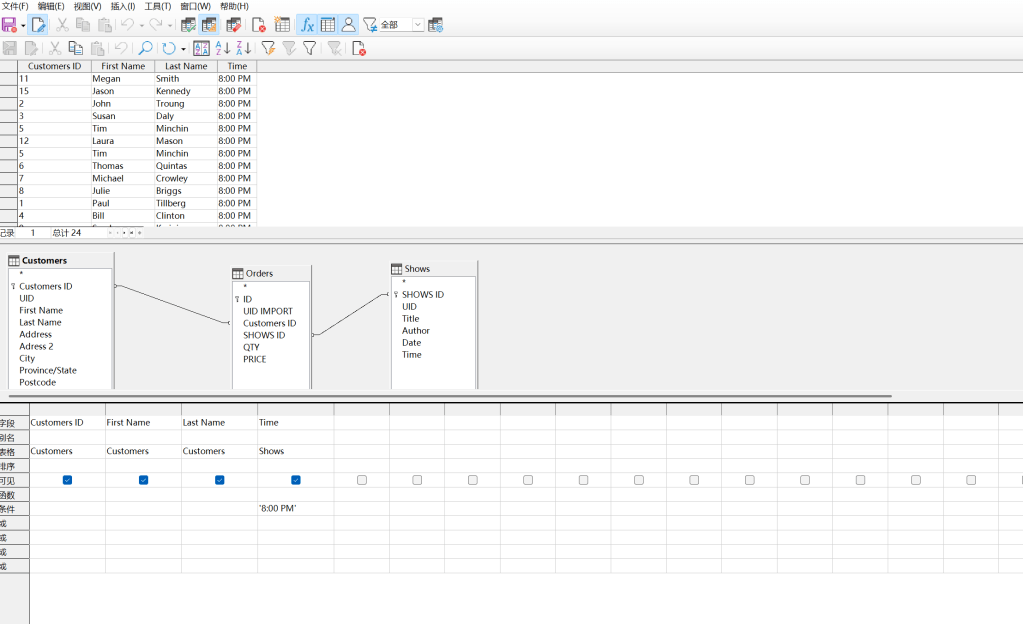
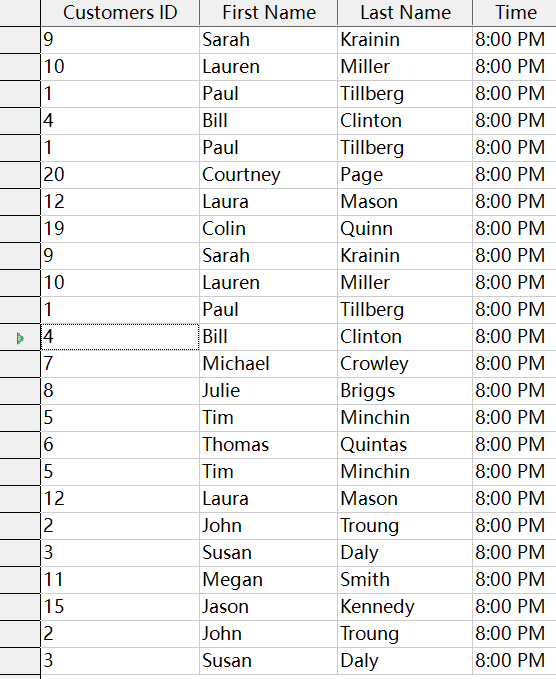
First of all, my computer is a window system. I downloaded the zip compressed package given by the course. After decompressing, right-clicked and opened it through libre office to generate a three-point csv file. ( Customer/Order/Shows) Secondly, I downloaded libre office and copied and pasted the contents of these three files into the “Table” column of libre, so that the system automatically generated three tables for me and automatically helped me set the primary key. After the import was successful, I renamed these three files to (Customer/Order/Shows) and changed the field names of customer id and show id from [text] to Biglnt. After that, I clicked the [work In the column, click [Relationship], then click Add Table, add all three tables, and enlarge the mouse. First, I double-clicked the [customer id] in the [customers] and [Orders] tables, so that the two tables formed an association line. Then, I used the same method to convert the SHOW id of the [orders] form and the [shows] table. They are connected together and finally saved. After that, I clicked the [Query Button] on the far right, selected [Create Query in {Design View}], selected all three forms and imported them, and then clicked [customers id] [first name] [last name] [time] (due to The question sent to me by email is: who wants to go to the theater at 8 p.m., so I need to import the time item), press F5, so that the form is displayed at the top. Finally, I fill in [‘8:00 PM’] in the [condition] item under the [time] field below, and press F5 again. , so that the query is successful. Of course, because the libre office I use is a Chinese class, there may be some language differences, but the result must be correct.
 The Ultimate Anime Troupe